I would like to show how to enable auto-import on IntelliJ IDEA to load libraries automatically.
Contents
▼1. Setting to load the relevant libraries automatically
1-1. Enable Maven auto-import on IntelliJ IDEA
We can find this icon from View -> Tool Windows -> Maven menu as blow.
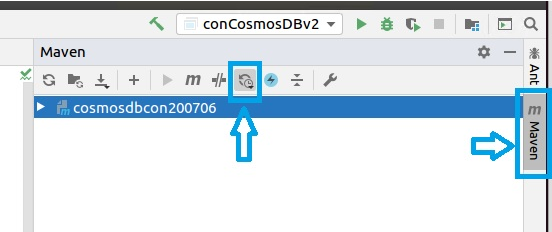
And then, we can choose “Enable auto-reload after any changes” after clicking “Toggle Auto Reload Mode”.

1.2. Check if you could confirm downloaded libraries after this settings
After you add the following dependencies in Pom.xml and save pom.xml, you can find downloaded libraries from File -> Project Structure -> Project Settings -> Libraries
I checked above setting on the following IntelliJ IDEA version before.

IntelliJ IDEA 2020.1.2 (Community Edition)
Build#IC-2017.7846.76, built on June 1, 2020
Runtime version: 11.0.7+10-b765.53 amd64
VM: OpenJDK 64-Bit: Server VM by JetBrains s.r.o
Powered by open-source software
▼2. Reference
How do I disable or enable Gradle / Maven auto-import for an IntelliJ IDEA project?
That’s all. Have a nice day ahead !!!