I will show Java code that save results of select query into a JSON file.
In the previous blog, I shared how to save results of select query on Cosmos DB into a text file. in this blog, I will save results into a JSON file.
Contents
- ▼1. What is a JSON format?
- ▼2. Prerequisites
- ▼3. Java code for saving results of select query on Cosmos DB into a JSON file
- 3-1. Making a directory
- 3-2. Deploying an Apache Maven project
- 3-3. Removing the existing App.java and AppTest.java
- 3-4. Starting Visual Studio Code
- 3-5. Adding Cosmos DB library into pom.xml and save it (Ctrl+S)
- 3-6. Coding for saving results of select query on Cosmos DB into a JSON file
- 3-7. Checking output of a JSON file
- ▼4. Reference
▼1. What is a JSON format?
The following data types are supported in JSON format.
- string
- number
- boolean
- null
- object
- Array
This is an example of a JSON file. Ref: JSON – Wikipedia
{
    "Records": [
        {
            "id": 1,
            "lastName": "Travase",
            "isRegistered": false
        },
        {
            "id": 2,
            "lastName": "Ken",
            "isRegistered": true
        },
        {
            "id": 3,
            "lastName": "Sai",
            "isRegistered": false
        }
    ]
}
▼2. Prerequisites
2-1. Free trial Azure Cosmos DB Account
You can use trial free Cosmos DB Account
https://azure.microsoft.com/ja-jp/try/cosmosdb/
2-2. Installing Visual Studio Code
sudo snap install --classic codehttps://code.visualstudio.com/docs/setup/linux
2-3. Installing Maven
Ref: Apache Kafka Word Count 実装 – Java No.44
line of 2-3
2-4. Creating a sample data
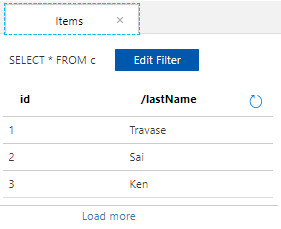
Ref: Java Azure Cosmos DB (SQL API) Database の作成方法 No.14
▼3. Java code for saving results of select query on Cosmos DB into a JSON file
3-1. Making a directory
Make a directory to create an application.
mkidr cosmosdbtest2
cd cosmosdbtest23-2. Deploying an Apache Maven project
cd cosmosdbtest2
mvn archetype:generate  -DinteractiveMode=false -DgroupId=org.example.cosmosdb.sql -DartifactId=sqldemo -DarchetypeArtifactId=maven-archetype-quickstart
(a part of the output)
xxxx
[INFO] Scanning for projects...
[INFO]
[INFO] ------------------< org.apache.maven:standalone-pom >--------------
[INFO] Building Maven Stub Project (No POM) 1
[INFO] --------------------------------[ pom ]----------------------------
[INFO]
[INFO] >>> maven-archetype-plugin:3.2.0:generate (default-cli) > generate-sources @ standalone-pom >>>
[INFO]
[INFO] <<< maven-archetype-plugin:3.2.0:generate (default-cli) < generate-sources @ standalone-pom <<<
[INFO]
[INFO]
[INFO] --- maven-archetype-plugin:3.2.0:generate (default-cli) @ standalone-pom ---
[INFO] Generating project in Batch mode
[INFO] -------------------------------------------------------------------
[INFO] Using following parameters for creating project from Old (1.x) Archetype: maven-archetype-quickstart:1.0
[INFO] -------------------------------------------------------------------
[INFO] Parameter: basedir, Value: /home/xxx/cosmosdbtest2/sqldemo
[INFO] Parameter: package, Value: org.example.cosmosdb.sql
[INFO] Parameter: groupId, Value: org.example.cosmosdb.sql
[INFO] Parameter: artifactId, Value: sqldemo
[INFO] Parameter: packageName, Value: org.example.cosmosdb.sql
[INFO] Parameter: version, Value: 1.0-SNAPSHOT
[INFO] project created from Old (1.x) Archetype in dir: /home/xxx/cosmosdbtest2/sqldemo
[INFO] -------------------------------------------------------------------
[INFO] BUILD SUCCESS
[INFO] -------------------------------------------------------------------
[INFO] Total time:  3.760 s
[INFO] Finished at: 2022-11-12T09:08:34+09:00
[INFO] -------------------------------------------------------------------
3-3. Removing the existing App.java and AppTest.java
rm ./sqldemo/src/main/java/org/example/comsosdb/sql/App.java
rm ./sqldemo/src/test/java/org/example/cosmosdb/sql/AppTest.java3-4. Starting Visual Studio Code
cd ./sqldemo
code .3-5. Adding Cosmos DB library into pom.xml and save it (Ctrl+S)
  <properties>
    <maven.compiler.source>1.8</maven.compiler.source>
    <maven.compiler.target>1.8</maven.compiler.target>
  </properties>

  <dependencies>
    <dependency>
      <groupId>junit</groupId>
      <artifactId>junit</artifactId>
      <version>3.8.1</version>
      <scope>test</scope>
    </dependency>
    <dependency>
      <groupId>com.azure</groupId>
      <artifactId>azure-cosmos</artifactId>
      <version>4.30.1</version>
    </dependency>
  </dependencies>
3-6. Coding for saving results of select query on Cosmos DB into a JSON file
cosmosdbjsonout.java is created.
package org.example.cosmosdb.sql;

import com.azure.cosmos.*;
import com.azure.cosmos.models.CosmosQueryRequestOptions;
import com.azure.cosmos.util.CosmosPagedIterable;

import java.io.File;
import java.io.FileNotFoundException;
import java.io.PrintStream;
import java.util.*;

public class cosmosdbjsonout {
 // select data from Csomos DB and save to JSON file

 public static class Family {
    public String id;
    public String lastName;
    public boolean isRegistered;

    public String getId() {
      return id;
    }

    public String getLastName() {
      return lastName;
    }

    public Family(String idv, String lastNamev, boolean isv) {
      id = idv;
      lastName = lastNamev;
      isRegistered = isv;
    }

    public String toJson(String idv, String lastNamev, boolean isv) {
      return "{\"id\":" + idv + ",\"lastName\":\"" + lastNamev + "\",\"isRegistered\":" + isv + "}";
    }

    public Family() {
    }
  }

  public static void main(String[] args) {
    String databaseName = "testdb";
    String endpoint = "https://xxx.documents.azure.com:443";
    String masterkey = "xxx";
    String containerName = "coll";

    try (CosmosClient cosmosClient = new CosmosClientBuilder().endpoint(endpoint).key(masterkey)
        .gatewayMode(GatewayConnectionConfig.getDefaultConfig()).consistencyLevel(ConsistencyLevel.SESSION)
        .connectionSharingAcrossClientsEnabled(true).contentResponseOnWriteEnabled(true)
        .userAgentSuffix("Applicationtest").preferredRegions(Collections.singletonList("East US")).buildClient()) {
      CosmosDatabase database = cosmosClient.getDatabase(databaseName);
      CosmosContainer container = database.getContainer(containerName);

      // run select query
      String query = "SELECT * FROM c";
      CosmosQueryRequestOptions options = new CosmosQueryRequestOptions();
      options.setMaxDegreeOfParallelism(2);
      CosmosPagedIterable<Family> results = container.queryItems(query, options, Family.class);
      File file = new File("/home/xxx/cosmosdbtest2/sqldemo/sample1.json");
      try {
        PrintStream ps = new PrintStream(file);
        System.setOut(ps);
      } catch (FileNotFoundException e) {
        e.printStackTrace();
      }

      System.out.print("{\"Records\":[");
      for (Family result : results) {
        // if first line, no comma
        if (result.getId().equals("1")) {
          System.out.print(result.toJson(result.getId(), result.getLastName(), result.isRegistered));
        } else {
          System.out.print("," + result.toJson(result.getId(), result.getLastName(), result.isRegistered));
        }
      }
    } catch (CosmosException e) {
      e.printStackTrace();
      System.err.println(e.getMessage());
    }
    System.out.println("]}");
  }

}3-7. Checking output of a JSON file
Check the sample1.json which is output of the previous code.
cat sample1.json

{"Records":[{"id":1,"lastName":"Travase","isRegistered":false},{"id":2,"lastName":"Ken","isRegistered":true},{"id":3,"lastName":"Sai","isRegistered":false}]}
▼4. Reference
- Azure Cosmos DB Trial Free Account https://docs.microsoft.com/ja-jp/azure/cosmos-db/optimize-dev-test#try-azure-cosmos-db-for-free
- https://code.visualstudio.com/docs/setup/linux
- Apache Kafka Word Count 実装 – Java No.44
- Java Azure Cosmos DB (SQL API) Database の作成方法 No.14
- Java – Azure Cosmos DB (SQL) : save results of select into a text file No.72
That’s all. Have a nice day, ahead !!!