How to calculate the compound interest using Java in VS code on Ubuntu is shown in this blog.
▼1. Calculate the compound interest
Rob advisor “WealthNavi” and accumulation NISA and private government bounds etc are executed by myself. the compound interest is implemented in these investments.
Compound interest is increased by adding interest for the principal and adding interest for the principal + interest next year. the asset will be steadily increased using this process for a long term. Compound interest Wiki

In this blog, how to calculate the compound interest by Java is shown.
▼2. Prerequisites
2-1. Installing Visual Studio Code
sudo snap install --classic codehttps://code.visualstudio.com/docs/setup/linux
2-2. Installing Maven
Apache Kafka Word Count – Java No.44 “2-3. Installing Apache Maven”
2-3. Creating a project by Apache Maven
mvn archetype:generate -DinteractiveMode=false -DgroupId=org.example.compound -DartifactId=comintsample02 -DarchetypeArtifactId=maven-archetype-quickstart2-4. Removing the existed both App.java and AppTest.java
rm ./comintsample02/src/main/java/org/example/compound/App.java
rm ./comintsample02/src/test/java/org/example/compound/AppTest.java2-5. Starting Visual Studio Code
cd ./mysqlconnection
code .
▼3. Calculating compound interest by Java
3-1. Creating a Java file to calculate compound interest
comint.java is created to calculate compound interest here.
The following 3 Inputs are needed to run this java code.
- Principal args[0]
- Rate args[1]
- Time/Year args[2]
package org.example.compound;

public class comint {
    public static double compoundInterest(double principal, double rate, double time) {
        if (time <= 0) {
            return principal;
        } else {
            double amount = principal * Math.pow(1 + (rate / 100), time);
            return amount;
        }
    }

    public static void main(String[] args) {
        double principal = Double.parseDouble(args[0]);
        System.out.println("Principal:  " + principal);
        double rate = Double.parseDouble(args[1]);
        System.out.println("rate:  "+ rate);
        double time = Double.parseDouble(args[2]);
        System.out.println("Year:  " + time);
        System.out.println("Compound Interest is: " + Math.round(compoundInterest(principal,rate,time)));
        System.out.println("Profit after 20% tax is: " + Math.round((compoundInterest(principal,rate,time)-principal)*0.8));
    }
}3-2. Error happens without inputs
Exception in thread "main" java.lang.ArrayIndexOutOfBoundsException: 0
        at org.example.compound.comint.main(comint.java:14)
3-3, Setting lunch.json for the initial parameters
lunch.json file is created to pass the initial parameters for this java. from icon of Debug as below, Choosing “Create a lunch.json file” and opening lunch.json are necessary.
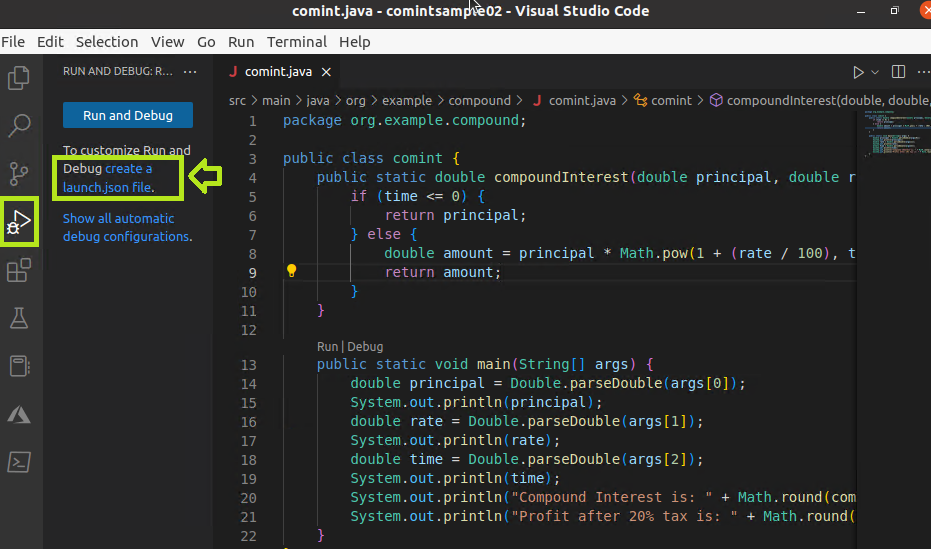
Putting 3 initial parameters in the following launch.json file is needed. 3 initial parameters are written in args. after that, the fail is saved by Ctrl+S etc.
{
    // Use IntelliSense to learn about possible attributes.
    // Hover to view descriptions of existing attributes.
    // For more information, visit: https://go.microsoft.com/fwlink/?linkid=830387
    "version": "0.2.0",
    "configurations": [
        {
            "type": "java",
            "name": "Launch Current File",
            "request": "launch",
            "mainClass": "${file}"
        },
        {
            "type": "java",
            "name": "Launch comint",
            "request": "launch",
            "mainClass": "org.example.compound.comint",
            "projectName": "comintsample02",
            "args": [
                "1000000",
                "0.05",
                "3"
            ]
        }
    ]
}

3-4. The results by Debug
For example, when purchasing the private government bounds, Principal 1 million Yen, Rate 0.05 % and 3 years investment are executed. after 3 years, 1001501 yen can be got. since in Japan, tax is about 20 % when selling them, the profit is 1201 yen.
Principal:  1000000.0
rate:  0.05
Year:  3.0
Compound Interest is: 1001501
Profit after 20% tax is: 1201
3-5. Principal, Rate, time/Years can be changed and can be recalculated.
By recalculating compound interest, Principal, Rate, time/Years are putted as parameters for Java code.
java -cp /home/xxx/comintsample02/target/classes org.example.compound.comint 1000000 5 10

Principal:  1000000.0
rate:  5.0
Year:  10.0
Compound Interest is: 1628895
Profit after 20% tax is: 503116
▼4. Reference
- WealthNavi
- Installing VS Code https://code.visualstudio.com/docs/setup/linux
- Installing Maven Apache Kafka Word Count – Java No.44 “2-3. Installing Apache Maven”
- Java – Visual Studio Code on Ubuntu No.24
- launch.json https://code.visualstudio.com/docs/editor/debugging#_launch-configurations
That’s all. Have a nice day ahead !!!