In this blog, how to create database on Azure Cosmos DB (SQL API) using Java is shown.
Contents
▼1. Some kinds of Azure Cosmos DB
Azure Cosmos DB is NoSQL Database. there are some kinds of API below.
- Core (SQL) API
- Cassandra API
- Mongo DB API
- Gremlin API
- Table API
Choose an API in Azure Cosmos DB
▼2. Prerequisites
2-1. Free trial Cosmos DB account is available without subscription.
https://azure.microsoft.com/ja-jp/try/cosmosdb/
2-2. Enable Maven auto-import in IntelliJ IDEA on Ubuntu
Enable auto-import on IntelliJ IDEA No.13
▼3. Creating Database , Container and Data on Cosmos DB (SQL API) の Database, Container by Java
3-1. Java Coding
These parameters should be changed according to your setting on your environment.
- end_point: Cosmos DB account name
- master_key: Account key
Family class is used to insert data into a container. operations are executed in the following order.
- Creating Database
- Creating Container with Provisioning RU/s 400
- Creating item
import com.azure.cosmos.*;
import com.azure.cosmos.models.*;
import com.azure.cosmos.util.CosmosPagedIterable;
import org.slf4j.Logger;
import org.slf4j.LoggerFactory;
import java.util.Collections;

public class CreateDBCosmosDBv {
    protected static final Logger log = LoggerFactory.getLogger(CreateDBCosmosDBv.class);

    public static class Family{
        public String id;
        public String lastName;
        public boolean isRegistered;
       public String getId(){
            return id;
        }

       public String getLastName(){
            return lastName;
        }

        public Family(String idv,String lastnamev,boolean isv){
            id=idv;
            lastName=lastnamev;
            isRegistered=isv;
        }
    }

    public static void main(String... args) {
        String databaseName = "testdb";
        String end_point = "https://xxxx.documents.azure.com:443";
        String master_key = "xxxx";
        String containerName = "coll";
        log.info("Prepare for data");
        Family family = new Family("1","Travase",false);
        try (CosmosClient cosmosClient = new CosmosClientBuilder().endpoint(end_point).key(master_key).gatewayMode(GatewayConnectionConfig.getDefaultConfig()).consistencyLevel(ConsistencyLevel.SESSION).connectionSharingAcrossClientsEnabled(true).contentResponseOnWriteEnabled(true).userAgentSuffix("My-Application-clienttest").preferredRegions(Collections.singletonList("West US")).buildClient()){
            log.info("The connection to Cosmos DB succeeded.");
            log.info("Create DB");
            CosmosDatabaseResponse databaseResponse = cosmosClient.createDatabaseIfNotExists(databaseName);
            CosmosDatabase database = cosmosClient.getDatabase(databaseResponse.getProperties().getId());
            log.info("Create container with 400 RU/s");
            CosmosContainerProperties containerProperties = new CosmosContainerProperties(containerName, "/lastName");
            CosmosContainerResponse cosmosContainerResponse = database.createContainerIfNotExists(containerProperties, ThroughputProperties.createManualThroughput(400));
            log.info("Set Container");
            CosmosContainer container = database.getContainer(containerName);
            log.info("Create item using container. Use lastName as partitionKey for the item");
            CosmosItemRequestOptions cosmosItemRequestOptions = new CosmosItemRequestOptions();
            log.info("insert data into items");
            CosmosItemResponse<Family> item = container.createItem(family, new PartitionKey(family.getLastName()),cosmosItemRequestOptions);
        }catch(CosmosException e){
            e.printStackTrace();
        }
    }
}3-2. A part of Results
[main] INFO CreateDBCosmosDBv - Prepare for data
[main] INFO com.azure.cosmos.implementation.RxDocumentClientImpl - Initializing DocumentClient with serviceEndpoint [https://xxxx.documents.azure.com:443], connectionPolicy [ConnectionPolicy{requestTimeout=PT5S, connectionMode=GATEWAY, maxConnectionPoolSize=1000, idleConnectionTimeout=PT1M, userAgentSuffix='My-Application-clienttest', throttlingRetryOptions=RetryOptions{maxRetryAttemptsOnThrottledRequests=9, maxRetryWaitTime=PT30S}, endpointDiscoveryEnabled=true, preferredRegions=[West US], multipleWriteRegionsEnabled=true, proxyType=null, inetSocketProxyAddress=null, readRequestsFallbackEnabled=true, connectTimeout=null, idleEndpointTimeout=null, maxConnectionsPerEndpoint=0, maxRequestsPerConnection=0}], consistencyLevel [Session], directModeProtocol [Tcp]
[main] INFO com.azure.cosmos.implementation.http.SharedGatewayHttpClient - creating a new shared HttpClient
[parallel-1] INFO com.azure.cosmos.implementation.RxDocumentClientImpl - Getting database account endpoint from https://xxxx.documents.azure.com:443
[main] INFO CreateDBCosmosDBv - The connection to Cosmos DB succeeded.
[main] INFO CreateDBCosmosDBv - Create DB
[main] INFO CreateDBCosmosDBv - Create container with 400 RU/s
[reactor-http-epoll-2] INFO com.azure.cosmos.implementation.SessionContainer - Registering a new collection resourceId [xxxx] in SessionTokens
[main] INFO CreateDBCosmosDBv - Set Container
[main] INFO CreateDBCosmosDBv - Create item using container. Use lastName as partitionKey for the item
[main] INFO CreateDBCosmosDBv - insert data into items
WARNING: An illegal reflective access operation has occurred
WARNING: Illegal reflective access by com.fasterxml.jackson.module.afterburner.util.MyClassLoader (file:xxxx) to method java.lang.ClassLoader.findLoadedClass(java.lang.String)
WARNING: Please consider reporting this to the maintainers of com.fasterxml.jackson.module.afterburner.util.MyClassLoader
WARNING: Use --illegal-access=warn to enable warnings of further illegal reflective access operations
WARNING: All illegal access operations will be denied in a future release
[main] INFO com.azure.cosmos.implementation.RxDocumentClientImpl - Shutting down ...
[main] INFO com.azure.cosmos.implementation.RxDocumentClientImpl - Closing Global Endpoint Manager ...
[main] INFO com.azure.cosmos.implementation.RxDocumentClientImpl - Closing StoreClientFactory ...
[main] INFO com.azure.cosmos.implementation.RxDocumentClientImpl - Shutting down reactorHttpClient ...
[main] INFO com.azure.cosmos.implementation.http.SharedGatewayHttpClient - closing one reference to the shared HttpClient, the number of remaining references is 0
[main] INFO com.azure.cosmos.implementation.http.SharedGatewayHttpClient - All references to shared HttpClient are closed. Closing the underlying HttpClient
[main] INFO com.azure.cosmos.implementation.RxDocumentClientImpl - Shutting down completed.
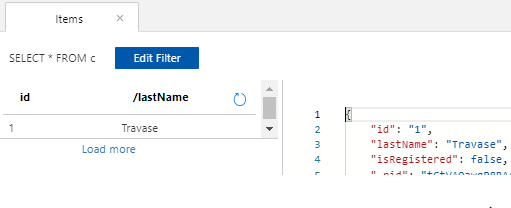
3-3. Azure Portal of Cosmos DB shows data
▼4. Preference
- Azure Cosmos DB free trial account https://docs.microsoft.com/ja-jp/azure/cosmos-db/optimize-dev-test#try-azure-cosmos-db-for-free
- Quickstart: Build a Java app to manage Azure Cosmos DB for NoSQL data
- Sample code
- CosmosItemResponse<T> Class https://docs.microsoft.com/en-us/java/api/com.azure.cosmos.models.cosmositemresponse?view=azure-java-stable
That’s all. Have a nice day !!!