I will show you the execute Rust programming language in Visual Studio Code on Ubuntu.
▼1. What is Rust ?
Rust is blazingly fast and memory-efficient without no runtime or garbage collector. Rust is memory-safety and thread-safety. we can use Rust on performance critical services. Ref: https://www.rust-lang.org/
These toolsets are installed when Rust is installed.
- Rustc : compiler
- Rustfmt : source Code formatter
- Clippy Rust linter : detecting issues with the source code
- Cargo Rust package manager : download Rust dependencies and build and run Rust programs.
▼2. Prerequisites
2-1. Installing Ubuntu 20.04.2 LTS
https://releases.ubuntu.com/20.04/
2-2. Install Visual Studio Code
sudo snap install --classic codehttps://code.visualstudio.com/docs/setup/linux
2-3. Installing Rust
Install Rust using the command (Ref) https://www.rust-lang.org/learn/get-started
// On Ubuntu
curl --proto '=https' --tlsv1.2 -sSf https://sh.rustup.rs | sh

// Update environment settings
source .bashrc

// Confirm rustc version
rustc --version

(output)
rustc 1.65.0 (897e37553 2022-11-02)

// installing up to date with the latest version by running
rustup update

(output)
info: syncing channel updates for 'stable-x86_64-unknown-linux-gnu'
info: checking for self-updates

  stable-x86_64-unknown-linux-gnu unchanged - rustc 1.65.0 (897e37553 2022-11-02)

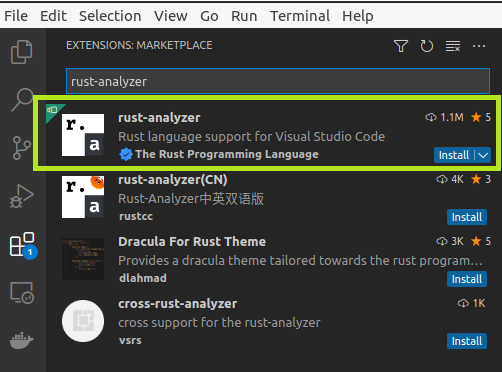
info: cleaning up downloads & tmp directories2-4. Installing rust-analyzer Extension
▼3. Print “Hello World!” using Rust
3-1. Creating Rust code to show Hello World in web site.
We use Cargo command to create a project.
cargo new hello_world
     Created binary (application) `hello_world` package
3-2. Starting Visual Studio Code
code .3-3. Checking a main.rs file
cat ./src/main.rs

fn main() {
    println!("Hello, world!");
3-4. Cargo Build
Start terminal (Ctrl+Shift+`) or Choosing New Terminal menue
cargo build

   Compiling hello_world v0.1.0 (/home/ubuntu20/hello_world)
Finished dev [unoptimized + debuginfo] target(s) in 0.51s3-5. Run cargo
cargo run

    Finished dev [unoptimized + debuginfo] target(s) in 0.00s
     Running `target/debug/hello_world`
Hello, world!
Or
./target/debug/hello_world
Hello, world!
▼4. Reference
That’s all. Have a nice day ahead !!!