自己投資としてチャレンジしている内容を Blog で公開しています。
今回は以前公開したC# Visual Studio Code JSON データ作成 on Ubuntu No.55 について補足したいと思います。
▼1. JSON データのプロパティが表示できていなかった問題
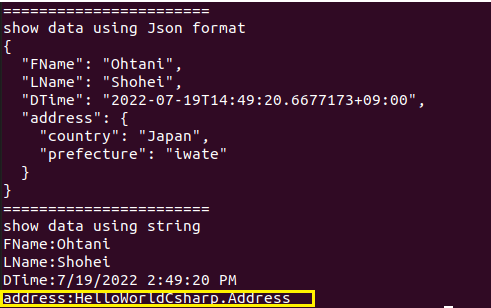
C# Visual Studio Code JSON データ作成 on Ubuntu No.55 で一部プロパティの値が表示できていませんでした。以下のキャプチャーの黄色い部分。
コードは以下です。
using System;
using Newtonsoft.Json;

namespace HelloWorldCsharp
{
    class Account
    {
        public string FName {get;set;} = string.Empty;
        public string LName {get;set;} = string.Empty;
        public DateTime DTime {get;set;}
        public Address address {get; set;} = default!;
    }
    public class Address
    {
        public string country {get;set;}=default!;
        public string prefecture {get;set;}=default!;
    }
    public class Program
    {
        static void Main(string[] args)
        {
            Account useraccount = new Account();
            useraccount.LName="Shohei";
            useraccount.FName="Ohtani";
            useraccount.DTime= DateTime.Now;
            useraccount.address= new Address {country="Japan",prefecture="iwate"};

            string userstr =JsonConvert.SerializeObject(useraccount,Formatting.Indented);

            Console.WriteLine("=======================");
            Console.WriteLine("show data using Json format");
            Console.WriteLine(userstr);
            Console.WriteLine("=======================");
            Console.WriteLine("show data using string");
            Console.WriteLine(string.Join("\n",typeof(Account).GetProperties().Select(info => $"{info.Name}:{info.GetValue(useraccount)}")));
        }
    }
}改めて、上のコードの実行結果は以下です。黄色い部分が、正しい値が表示できていなかった部分です。
(上のコードの実行結果)
=======================
show data using Json format
{
  "FName": "Ohtani",
  "LName": "Shohei",
  "DTime": "2022-07-19T14:49:20.6677173+09:00",
  "address": {
    "country": "Japan",
    "prefecture": "iwate"
  }
}
=======================
show data using string
FName:Ohtani
LName:Shohei
DTime:7/19/2022 2:49:20 PM
address:HelloWorldCsharp.Address
これを以下のように修正します。その結果、大谷翔平さんの country と prefecture の値が取れています。
using System;
using Newtonsoft.Json;

namespace HelloWorldCsharp
{
    class Account
    {
        public string FName {get;set;} = string.Empty;
        public string LName {get;set;} = string.Empty;
        public DateTime DTime {get;set;}
        public Address address {get; set;} = default!;
    }
    public class Address
    {
        public string country {get;set;}=default!;
        public string prefecture {get;set;}=default!;
    }
    public class Program
    {
        static void Main(string[] args)
        {
            Account useraccount = new Account();
            useraccount.LName="Shohei";
            useraccount.FName="Ohtani";
            useraccount.DTime= DateTime.Now;
            useraccount.address= new Address {country="Japan",prefecture="iwate"};

            string userstr =JsonConvert.SerializeObject(useraccount,Formatting.Indented);

            //select info from userstr
            Console.WriteLine("======================= userstr =======================");
            Console.WriteLine("show data using Json format");
            Console.WriteLine(userstr); //output json string

            //input info from userstr
            //Console.WriteLine("show data using string");
            //Console.WriteLine(string.Join("\n",typeof(Account).GetProperties().Select(info => $"{info.Name}:{info.GetValue(useraccount)}")));

            Console.WriteLine("========================================================");
            Console.WriteLine("FName: " + useraccount.FName); //output FName
            Console.WriteLine("LName: " + useraccount.LName); //output LName
            Console.WriteLine("DTime: " + useraccount.DTime); //output DTime
            Console.WriteLine("address-country: " + useraccount.address.country); //output country
            Console.WriteLine("address-prefecture: " + useraccount.address.prefecture); //output prefecture
            Console.WriteLine("========================================================");
        }
    }
}
上の修正したコードの結果が以下になります。大谷翔平さんの country と prefecture の値が取れています。
> dotnet run
======================= userstr =======================
show data using Json format
{
  "FName": "Ohtani",
  "LName": "Shohei",
  "DTime": "2022-08-04T22:21:47.8686959+09:00",
  "address": {
    "country": "Japan",
    "prefecture": "iwate"
  }
}
========================================================
FName: Ohtani
LName: Shohei
DTime: 2022/08/04 22:21:47
address-country: Japan
address-prefecture: iwate
========================================================
▼2. 参考情報
C# Visual Studio Code JSON データ作成 on Ubuntu No.55
Working with C#
以上です。参考になりましたら幸いです。