自己投資としてチャレンジしている内容を Blog で公開しています。
今回は Azure Cosmos DB (SQL API) への接続方法について紹介します。(In English Java – Connect to Azure Cosmos DB (SQL API) No.11)
▼1. Azure Cosmos DB への 接続
Azure Cosmos DB は NoSQL Database で Relational Database とは異なり、スキーマやテーブルをあらかじめ定義する必要はなく、データを分散しクエリ実行時パフォーマンスが得られるように Partition key を決め collection を作成するだけで利用できます。今回はこの Azure Cosmos DB へ接続する方法を案内します。詳細は以降に記載の参考情報の (2) のリンクを確認ください。
▼2. 事前準備
2-1. 以下のサイトから無料で利用できる Azure Cosmos DB を用意します。
Azure を利用するために必要な Subscription を用意する必要はありません。
https://azure.microsoft.com/ja-jp/try/cosmosdb/
2-2. Maven auto-import を IntelliJ IDEA で有効にします。
Pom.xml で記載したライブラリを自動でインポートするため、IntelliJ のメニューにある View -> Tool Windows -> Maven を選択すると以下のように Maven が右上に表示されます。
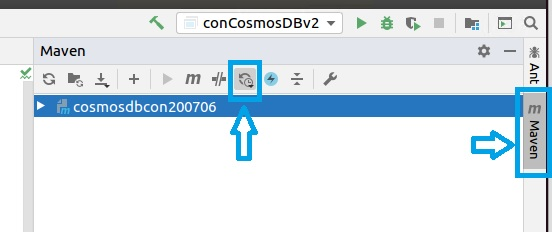
さらに下のように Toggle Auto Reload Mode をクリックし、Enable auto-reload after any changes を選択します。
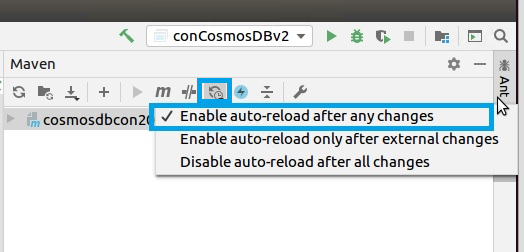
2-3. Pom.xml を更新します。
Pom.xml に以下のように必要なライブラリー slf4j-simple , azure-cosmos, netty-tcnative を指定します。その後、上記 2-2 設定により、ライブラリーが自動でダウンロードされます。File -> Project Structure -> Project Settings -> Libraries で自動でダウンロードされたライブラリーが確認できます。以下は例です。version は利用される際の最新の version を指定ください。
<dependencies>
    <dependency>
        <groupId>org.slf4j</groupId>
        <artifactId>slf4j-simple</artifactId>
        <version>1.7.30</version>
    </dependency>
    <!-- https://mvnrepository.com/artifact/com.azure/azure-cosmos -->
    <dependency>
        <groupId>com.azure</groupId>
        <artifactId>azure-cosmos</artifactId>
        <version>4.1.0</version>
    </dependency>
    <dependency>
        <groupId>io.netty</groupId>
        <artifactId>netty-tcnative</artifactId>
        <version>2.0.31.Final</version>
        <classifier>linux-x86_64</classifier>
    </dependency>
</dependencies>
▼3. Cosmos DB への接続
3-1. Cosmos DB へ接続する Java コードの作成
以下のコードで Azure Cosmos DB に接続します。
end_point の xxx と、master_key の xxx は、それぞれ利用する Cosmos DB のアカウント名とキーに書き換えます。CosmosClient を利用して Cosmos DB に接続します。
import com.azure.cosmos.*;
import org.slf4j.Logger;
import org.slf4j.LoggerFactory;
import java.util.Collections;

public class conCosmosDBv3 {
    protected static final Logger log = LoggerFactory.getLogger(conCosmosDBv3.class);
    public static void main(String[] args) {
        String databaseName = "testcosmosdb";
        String end_point = "https://xxxx.documents.azure.com:443";
        String master_key = "xxxx";
        try (CosmosClient cosmosClient = new CosmosClientBuilder().endpoint(end_point).key(master_key).directMode(DirectConnectionConfig.getDefaultConfig()).consistencyLevel(ConsistencyLevel.SESSION).connectionSharingAcrossClientsEnabled(true).contentResponseOnWriteEnabled(true).userAgentSuffix("My-Application-clienttest").preferredRegions(Collections.singletonList("West US")).buildClient()){
            log.info("The connection to Cosmos DB succeeded.");
        }catch(CosmosException e){
            e.printStackTrace();
        }
    }
}3-2. 実行結果
[main] INFO com.azure.cosmos.implementation.RxDocumentClientImpl - Initializing DocumentClient with serviceEndpoint [https://xxx.documents.azure.com:443], connectionPolicy [ConnectionPolicy{requestTimeout=PT5S, connectionMode=DIRECT, maxConnectionPoolSize=1000, idleConnectionTimeout=PT0S, userAgentSuffix='My-Application-clienttest', throttlingRetryOptions=RetryOptions{maxRetryAttemptsOnThrottledRequests=9, maxRetryWaitTime=PT30S}, endpointDiscoveryEnabled=true, preferredRegions=[West US], multipleWriteRegionsEnabled=true, proxyType=null, inetSocketProxyAddress=null, readRequestsFallbackEnabled=true, connectTimeout=PT1M, idleEndpointTimeout=PT1M10S, maxConnectionsPerEndpoint=130, maxRequestsPerConnection=30}], consistencyLevel [Session], directModeProtocol [Tcp]
[main] INFO com.azure.cosmos.implementation.http.SharedGatewayHttpClient - creating a new shared HttpClient
[parallel-1] INFO com.azure.cosmos.implementation.RxDocumentClientImpl - Getting database account endpoint from https://xxx.documents.azure.com:443
[main] INFO com.azure.cosmos.implementation.directconnectivity.SharedTransportClient - creating a new shared RntbdTransportClient
[main] INFO conCosmosDBv3 - The connection to Cosmos DB succeeded.
[main] INFO com.azure.cosmos.implementation.RxDocumentClientImpl - Shutting down ...
[main] INFO com.azure.cosmos.implementation.RxDocumentClientImpl - Closing Global Endpoint Manager ...
[main] INFO com.azure.cosmos.implementation.RxDocumentClientImpl - Closing StoreClientFactory ...
[main] INFO com.azure.cosmos.implementation.directconnectivity.SharedTransportClient - closing one reference to the shared RntbdTransportClient, the number of remaining references is 0
[main] INFO com.azure.cosmos.implementation.directconnectivity.SharedTransportClient - All references to shared RntbdTransportClient are closed. Closing the underlying RntbdTransportClient
[main] INFO com.azure.cosmos.implementation.RxDocumentClientImpl - Shutting down reactorHttpClient ...
[main] INFO com.azure.cosmos.implementation.http.SharedGatewayHttpClient - closing one reference to the shared HttpClient, the number of remaining references is 0
[main] INFO com.azure.cosmos.implementation.http.SharedGatewayHttpClient - All references to shared HttpClient are closed. Closing the underlying HttpClient
[main] INFO com.azure.cosmos.implementation.RxDocumentClientImpl - Shutting down completed.
▼4. 参考情報
(1) Azure Cosmos DB を無料で試す
https://docs.microsoft.com/ja-jp/azure/cosmos-db/optimize-dev-test#try-azure-cosmos-db-for-free
(2) NoSQL データベースとリレーショナル データベースの違いについて
https://docs.microsoft.com/ja-jp/azure/cosmos-db/relational-nosql
(3) Azure Cosmos DB Java SDK v4 for Core (SQL) API: release notes and resources
https://docs.microsoft.com/en-us/azure/cosmos-db/sql-api-sdk-java-v4
(4) How do I disable or enable Gradle / Maven auto-import for an IntelliJ IDEA project?
https://stackoverflow.com/questions/43192504/how-do-i-disable-or-enable-gradle-maven-auto-import-for-an-intellij-idea-proje
(5) Microsoft Azure Cosmos DB Sync Java SDK
https://github.com/Azure/azure-documentdb-java
以上です。参考になりましたら幸いです。