自己投資の一つとしてチャレンジしている事を Blog で公開しています。今回は Apache Hive を以前作成した Spark の環境にインストールしたいと思います。
————————————
▼1. Apache Hive とは?
————————————
Apache Hive とはデータウェアハウスの環境であり、Hadoop の分散ストレージシステム (HDFS) 上にある大量のデータセットを処理し、それに対してクエリを実行できる環境を指します。 Apache Hive は Apache Haoop 上で動作します。 Hive は SQL のようなクエリ言語が利用できます。HiveQL (Hive Query Language) と呼ばれています。Ref: Apache Hive
————————————
▼2. Apache Hive のインストール
————————————
2-1. 本 blog で紹介した 3 node の Apache Hadoop をインストールした環境に hadoop のユーザーでName Node にログインし、以降の作業を実施します。
Ref: Apache Hadoop クラスターのインストール (3 ノード) No.28 – 2021/06
もしくは 本 blog で紹介した 3 node の Apache Spark の環境で以降の作業を実施します。
Ref: Apache Spark インストール – 3 ノード No.29 – 2021/07
2-2. Name Node (Master node) にて、 Apache Hive (3.1.3) をダウンロードします。
以降 Name Node の作業しかありません。Data Node での Hive の設定はないので、Name Node 1台にインストールするイメージとなります。Ref: Index of /hive (apache.org)
cd /usr/local
sudo wget https://dlcdn.apache.org/hive/hive-3.1.3/apache-hive-3.1.3-bin.tar.gz2-3. ダウンロードした apache-hive-3.1.3-bin.tar.gz を解凍します。パスの名前を変更します。
sudo tar xvzf apache-hive-3.1.3-bin.tar.gz
sudo mv aapache-hive-3.1.3-bin hive
2-4. Hive の環境変数の設定を行います。
cd hive
vi ~/.bashrc
以下をファイルの末尾に追記します。
# Set HIVE_HOME
export HIVE_HOME=/usr/local/hive
export PATH=$PATH:$HIVE_HOME/bin
設定を反映させるために以下のコマンドを実行します。
source ~/.bashrc
2-5. HDFS の中に Hive のディレクトリを作成します。手元の環境に合わせフォルダーのパスを変更ください。
(例)
hdfs dfs -mkdir /user/hadoop/bigdata
hdfs dfs -mkdir /user/hadoop/bigdata/tmp
hdfs dfs -mkdir -p /user/hadoop/bigdata/hive/warehouse
hdfs dfs -chmod 777 /user/hadoop/bigdata/tmp
hdfs dfs -chmod g+w /user/hadoop/bigdata/hive/warehouse
2-6. Hive の設定を行います。hive-env.sh を編集します。
cd /user/local/hive/conf
sudo cp hive-env.sh.template hive-env.sh
sudo vi hive-env.sh
以下をファイルの末尾に追記します。手元の環境に合わせフォルダーのパスを変更ください。
# Set HADOOP_HOME to point to a specific hadoop install directory
HADOOP_HOME=/home/hadoop/hadoop

# Hive Configuration Directory can be controlled by:
export HIVE_CONF_DIR=/usr/local/hive/conf

# Java Home
export JAVA_HOME=/usr/lib/jvm/java-8-openjdk-x64
2-7. Metastore の設定を行います。
Metastore には Hive テーブルのメタデータを保存し、リレーショナルデータベースのパーティションを保存します。既定では Derby SQL Server が利用されており、ユーザーは MySQL, Postgres, Oracle MS SQL Server を Hive Metastore として利用できます。
今回は Metastore として MySQL を使います。Metastore の設定は、hive-site.xml ファイルに保存します。
2-7-1. 最新の mysql のバージョンをインストール後設定を行います。
# mysql をインストール
sudo apt-get update
sudo apt-get install mysql-server

# mysql service を起動
sudo systemctl start mysql

# マシン Reboot 後、Database server が起動するように設定。
sudo systemctl enable mysql
2-7-2. mysql java connector をダウンロードします。
mysql server のインストールが完了した後、mysql java connector を以下のコマンドを実行しインストールします。MySQL :: Download Connector/J から OS のバージョンに合わせ mysql-connector-java_8.0.30-1ubuntu20.04_all.deb をダウンロードします。
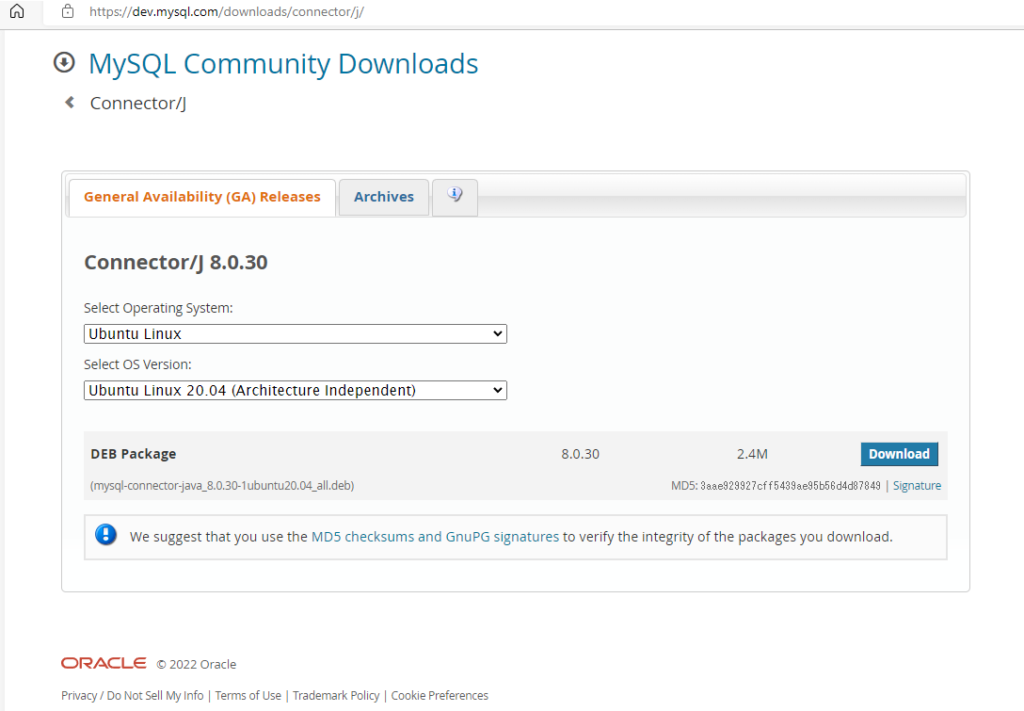
“Download” ボタンをクリックすると以下のサイトに変わり、”No thanks, just start my download” をクックします。
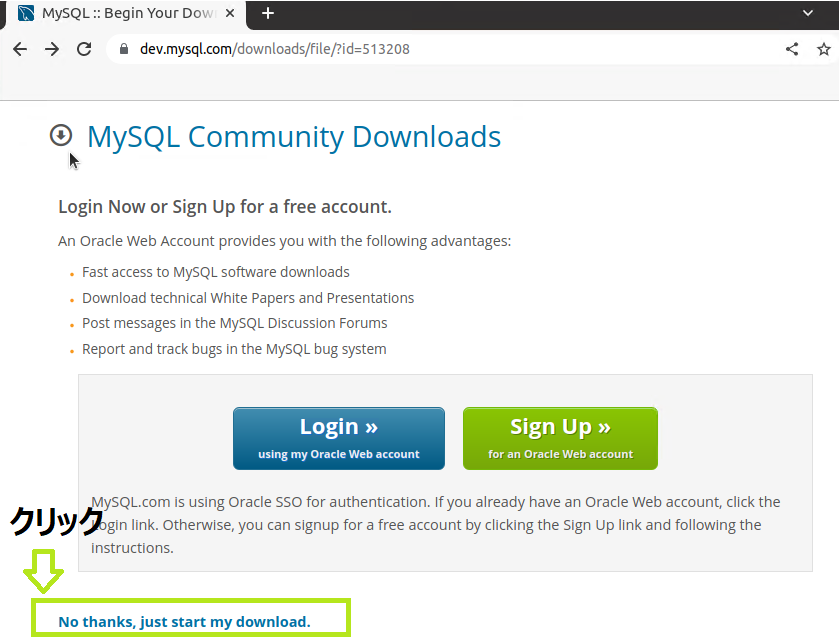
2-7-3. mysql java connector をインストールします。
sudo apt install ./mysql-connector-java_8.0.30-1ubuntu20.04_all.deb
sudo ln -s /usr/share/java/mysql-connector-java-8.0.30.jar $HIVE_HOME/lib/mysql-connector-java.jar
2-7-4. metastore データベースと hiveuser を作成します。
Hive の metastore データーベースと、hiveuser ユーザーおよび パスワード hivepassword で接続出来るようにします。
# root ユーザーがパスワードで接続出来るように設定を変更します。
# mysql インストール後、パスワードなしの root で接続します。

sudo mysql -u root

# root ユーザーに対しパスワードで接続できるよう plugin を変更します。

mysql> USE mysql;
mysql> UPDATE user SET plugin='caching_sha2_password' WHERE User='root';
mysql> FLUSH PRIVILEGES;
mysql> select user,host,plugin from mysql.user;
mysql> exit;

# mysql を再起動

sudo service mysql restart

# metastore データーベース作成と schema の作成を行います。
# mysql に root で接続、パスワードなし(パスワード求められたら Enter  を押します)

mysql -u root -p

# metastore データベースの作成し、metastore の schema の作成

mysql> CREATE DATABASE metastore;
mysql> USE metastore;
mysql> SOURCE /usr/local/hive/scripts/metastore/upgrade/mysql/hive-schema-3.1.0.mysql.sql;

# hiveuser ユーザー作成および パスワード hivepassword で接続出来るようにします。

mysql> CREATE USER 'hiveuser'@'localhost' IDENTIFIED BY 'hivepassword';
mysql> GRANT all on *.* to 'hiveuser'@'localhost';
mysql> flush privileges;
mysql> exit;
2-7-5. hive-site.xml ファイルの作成
# hive の各種ログファイルの保存のためディレクトリを作成し権限を変更します。
cd /usr/local/hive
sudo mkdir ./tmp
sudo chmod 777 ./tmp

sudo mkdir /var/log/hive/operation_logs
sudo mkdir /var/log/hive/operation_logs2
sudo chmod 777 /var/log/hive/operation_logs
sudo chmod 777 /var/log/hive/operation_logs2

# template から hive-site.xml を作成します。
cd /usr/local/hive/conf/
sudo cp hive-default.xml.template hive-site.xml

# hive-site.xml を編集します。
sudo vi hive-site.xml
手元の環境では以下を変更しました。
<configuration>
   <property>
      <name>javax.jdo.option.ConnectionURL</name>
      <value>jdbc:mysql://localhost/metastore?createDatabaseIfNotExist=true</value>
      <description>metadata is stored in a MySQL server</description>
   </property>
   <property>
      <name>javax.jdo.option.ConnectionDriverName</name>
      <value>com.mysql.jdbc.Driver</value>
      <description>com.mysql.cj.jdbc.Driver</description>
   </property>
   <property>
      <name>javax.jdo.option.ConnectionUserName</name>
      <value>hiveuser</value>
      <description>user name for connecting to mysql server</description>
   </property>
   <property>
      <name>javax.jdo.option.ConnectionPassword</name>
      <value>hivepassword</value>
      <description>hivepassword for connecting to mysql server</description>
   </property>
   <property>
        <name>hive.metastore.warehouse.dir</name>
        <value>/bigdata/hive/warehouse</value>
        <description>location of default database for the warehouse</description>
    </property>
    <property>
        <name>hive.metastore.uris</name>
        <value>thrift://localhost:9083</value>
        <description>Thrift URI for the remote metastore.</description>
    </property>
    <property>
        <name>hive.server2.enable.doAs</name>
        <value>false</value>
    </property>
   <property>
        <name>hive.downloaded.resources.dir</name>
  <!--
     <value>${system:java.io.tmpdir}/${hive.session.id}_resources</value>
   -->
        <value>/usr/local/hive/tmp/${hive.session.id}_resources</value>
        <description>Temporary local directory for added resources in the remote file system.</description>
    </property>
   <property>
<name>hive.server2.logging.operation.log.location</name>
  <!-- <value>${system:java.io.tmpdir}/${system:user.name}/operation_logs</value>
   -->
  <value>/var/log/hive/operation_logs</value>
   </property>
   <property>
    <name>hive.querylog.location</name>
  <!--
    <value>${system:java.io.tmpdir}/${system:user.name}</value>
   -->
  <value>/var/log/hive/${system:user.name}</value>
    <description>Location of Hive run time structured log file</description>
   </property>
   <property>
    <name>hive.exec.local.scratchdir</name>
  <!--
    <value>${system:java.io.tmpdir}/${system:user.name}</value>
   -->
  <value>/var/log/hive/operation_logs2</value>
    <description>Local scratch space for Hive jobs</description>
   </property>
   <property>
    <name>hive.metastore.schema.verification</name>
    <value>false</value>
    <description>
      Enforce metastore schema version consistency.
      True: Verify that version information stored in is compatible with one from Hive jars.  Also disable automatic
            schema migration attempt. Users are required to manually migrate schema after Hive upgrade which ensures
            proper metastore schema migration. (Default)
      False: Warn if the version information stored in metastore doesn't match with one from in Hive jars.
    </description>
   </property>

</configuration>
2-7-6. hive metastore を起動します。
$hive --service metastore

(output)
2022-08-01 16:45:39: Starting Hive Metastore Server
SLF4J: Class path contains multiple SLF4J bindings.
SLF4J: Found binding in [jar:file:/usr/local/hive/lib/log4j-slf4j-impl-2.17.1.jar!/org/slf4j/impl/StaticLoggerBinder.class]
SLF4J: Found binding in [jar:file:/home/hadoop/hadoop/share/hadoop/common/lib/slf4j-log4j12-1.7.30.jar!/org/slf4j/impl/StaticLoggerBinder.class]
SLF4J: See http://www.slf4j.org/codes.html#multiple_bindings for an explanation.
SLF4J: Actual binding is of type [org.apache.logging.slf4j.Log4jLoggerFactory]
2-7-7. hive コンソールを起動します。
$hive

(output)
SLF4J: Class path contains multiple SLF4J bindings.
SLF4J: Found binding in [jar:file:/usr/local/hive/lib/log4j-slf4j-impl-2.17.1.jar!/org/slf4j/impl/StaticLoggerBinder.class]
SLF4J: Found binding in [jar:file:/home/hadoop/hadoop/share/hadoop/common/lib/slf4j-log4j12-1.7.30.jar!/org/slf4j/impl/StaticLoggerBinder.class]
SLF4J: See http://www.slf4j.org/codes.html#multiple_bindings for an explanation.
SLF4J: Actual binding is of type [org.apache.logging.slf4j.Log4jLoggerFactory]
Hive Session ID = b9332df0-be44-404a-98e4-edf939aa704a

Logging initialized using configuration in jar:file:/usr/local/hive/lib/hive-common-3.1.3.jar!/hive-log4j2.properties Async: true
Hive-on-MR is deprecated in Hive 2 and may not be available in the future versions. Consider using a different execution engine (i.e. spark, tez) or using Hive 1.X releases.
Hive Session ID = d663c8f4-9bab-4680-b12d-239860807cc9
hive>
2-7-8. hive クエリを実行しテーブル作成後、データを insert します。
hive> show databases;
OK
default
Time taken: 0.857 seconds, Fetched: 1 row(s)

hive> use default;
OK
Time taken: 0.167 seconds
hive> create table test(id int, name string);
OK
Time taken: 2.445 seconds

hive> insert into test values(1,'taro');
Query ID = hadoop_20220801164803_e92e5237-6d65-48ce-8a68-596f9e994e8c
Total jobs = 3
Launching Job 1 out of 3
Number of reduce tasks determined at compile time: 1
In order to change the average load for a reducer (in bytes):
  set hive.exec.reducers.bytes.per.reducer=<number>
In order to limit the maximum number of reducers:
  set hive.exec.reducers.max=<number>
In order to set a constant number of reducers:
  set mapreduce.job.reduces=<number>
Starting Job = job_1659267437163_0001, Tracking URL = http://xxxx:8088/proxy/application_1659267437163_0001/
Kill Command = /home/hadoop/hadoop/bin/mapred job  -kill job_1659267437163_0001
Hadoop job information for Stage-1: number of mappers: 1; number of reducers: 1
2022-08-01 16:48:26,905 Stage-1 map = 0%,  reduce = 0%
2022-08-01 16:48:38,478 Stage-1 map = 100%,  reduce = 0%, Cumulative CPU 2.27 sec
2022-08-01 16:48:47,879 Stage-1 map = 100%,  reduce = 100%, Cumulative CPU 4.12 sec
MapReduce Total cumulative CPU time: 4 seconds 120 msec
Ended Job = job_1659267437163_0001
Stage-4 is selected by condition resolver.
Stage-3 is filtered out by condition resolver.
Stage-5 is filtered out by condition resolver.
Moving data to directory hdfs://xxxx:9000/bigdata/hive/warehouse/test/.hive-staging_hive_2022-08-01_16-48-03_608_3498919742809450738-1/-ext-10000
Loading data to table default.test
MapReduce Jobs Launched:
Stage-Stage-1: Map: 1  Reduce: 1   Cumulative CPU: 4.12 sec   HDFS Read: 15320 HDFS Write: 238 SUCCESS
Total MapReduce CPU Time Spent: 4 seconds 120 msec
OK
Time taken: 49.649 seconds

hive> select * from test;
OK
1	taro
Time taken: 0.512 seconds, Fetched: 1 row(s)

hive>
2-7-9. mysql の metastore を確認し、test テーブルが作成されているか見てみます。
$ sudo mysql -u root
Welcome to the MySQL monitor.  Commands end with ; or \g.
Your MySQL connection id is 211
Server version: 8.0.30-0ubuntu0.20.04.2 (Ubuntu)

Copyright (c) 2000, 2022, Oracle and/or its affiliates.

Oracle is a registered trademark of Oracle Corporation and/or its
affiliates. Other names may be trademarks of their respective
owners.

Type 'help;' or '\h' for help. Type '\c' to clear the current input statement.

mysql> use metastore;
Reading table information for completion of table and column names
You can turn off this feature to get a quicker startup with -A

Database changed
mysql> select * from TBLS;
+--------+-------------+-------+------------------+--------+------------+-----------+-------+----------+---------------+--------------------+--------------------+----------------------------------------+
| TBL_ID | CREATE_TIME | DB_ID | LAST_ACCESS_TIME | OWNER  | OWNER_TYPE | RETENTION | SD_ID | TBL_NAME | TBL_TYPE      | VIEW_EXPANDED_TEXT | VIEW_ORIGINAL_TEXT | IS_REWRITE_ENABLED                     |
+--------+-------------+-------+------------------+--------+------------+-----------+-------+----------+---------------+--------------------+--------------------+----------------------------------------+
|      1 |  1659340036 |     1 |                0 | hadoop | USER       |         0 |     1 | test     | MANAGED_TABLE | NULL               | NULL               | 0x00                                   |
+--------+-------------+-------+------------------+--------+------------+-----------+-------+----------+---------------+--------------------+--------------------+----------------------------------------+
1 row in set (0.00 sec)

mysql>
————————————
▼3. 参考情報
————————————
(1) Apache Hive
(2) Apache Hadoop クラスターのインストール (3 ノード) No.28 – 2021/06
(3) Apache Spark インストール – 3 ノード No.29 – 2021/07
(4) Index of /hive (apache.org)
(5) MySQL :: Download Connector/J
(6) Hive Installation on ubuntu 18.04 | MySQL Metastore | by Adarsh Ms | Analytics Vidhya | Medium
以上です。参考になったら幸いです。