自己投資としてチャレンジしている内容を Blog で公開しています。今回は Apache Spark の Spark SQL を利用した Dataset の操作に関するコードを紹介します。
Summary
▼1. Spark SQL の利用
Spark SQL を利用すると Relational Database で利用する SQL 文のようなクエリでデータの操作が可能です。シンプルなコードでファイルからデータを取り込め、加工、出力などができます。
▼2. 事前準備
2-1. Apache Spark クラスターを作成
詳細は以前 blog で紹介したサイトを参照ください。Apache Spark インストール – 3 ノード No.29
2-2. Spark で処理するデータを HDFS 上に配置
2-2-1. ホームディレクトリの作成後、その配下にディレクトリを作成
既に作成されている場合は飛ばします。
hdfs dfs -mkdir -p /user/hadoop
hdfs dfs -mkdir appbox2-2-2. ファイルをディレクトリにコピー
Spark インストール時に同梱されている people.json を 作成したディレクトリ appbox にコピーします。あとで行う wordcount の入力のファイルとして利用します。
sudo cp ~/spark/examples/src/main/resources/people.json ./
hdfs dfs -put people.json appbox2-2-3. コピーしたファイルの確認
hdfs dfs -ls appbox

--- 出力結果の例 ----
Found 1 items
-rw-r--r-- 1 hadoop supergroup xxx 2021-07-04 10:00 appbox/README.md
-rw-r--r-- 1 hadoop supergroup xxx 2021-07-09 10:00 appbox/people.json
--------
▼3. Spark SQL を利用した Dataset の操作
以降のコードでは SparkSession を作成後、JSON 形式のデータを DataFrame に取り込み、条件に合わせてデータを表示しています。
3-1. Sparktest のフォルダを作成
mkdir ~/SparkSQLBasic
sudo chown -R hadoop ~/SparkSQLBasic
cd ~/SparkSQLBasic
以下のような階層でフォルダおよびファイルを作成していきます。
./pom.xml (3-2)
./src
./src/main
./src/main/java
./src/main/java/SparkSQLBasiceg.java (3-3)
3-2. pom.xml を作成し、Sparktest 配下 (./pom.xml) に配置
<project>
  <groupId>edu.berkeley</groupId>
  <artifactId>simple-project</artifactId>
  <modelVersion>4.0.0</modelVersion>
  <name>Simple Project</name>
  <packaging>jar</packaging>
  <version>1.0</version>
  <dependencies>
    <dependency> <!-- Spark dependency -->
      <groupId>org.apache.spark</groupId>
      <artifactId>spark-sql_2.12</artifactId>
      <version>3.1.2</version>
      <scope>provided</scope>
    </dependency>
  </dependencies>
  <build>
    <plugins>
      <plugin>
        <groupId>org.apache.maven.plugins</groupId>
        <artifactId>maven-compiler-plugin</artifactId>
        <version>3.3</version>
        <configuration>
          <source>1.8</source>
          <target>1.8</target>
       </configuration>
     </plugin>
   </plugins>
  </build>
</project>
3-3. SparkSQLBasiceg.java を作成し /src/main/java/ 配下に配置
/* SparkSQLBasiceg.java */
import org.apache.spark.sql.SparkSession;
import org.apache.spark.sql.Dataset;
import org.apache.spark.sql.Row;
import static org.apache.spark.sql.functions.col;

public class SparkSQLBasiceg {
  public static void main(String[] args) {
    SparkSession spark = SparkSession.builder().appName("Java Spark SQL basic example").config("spark.some.config.option","some-value").getOrCreate();
    Dataset<Row> df = spark.read().json("/user/hadoop/appbox/people.json");

    System.out.println("Displays the content of the DataFrame.");
    df.show();

    System.out.println("Print the schema in a tree format.");
    df.printSchema();

    System.out.println("Select only the name column.");
    df.select("name").show();

    System.out.println("Select everybody, but increment the age by 1");
    df.select(col("name").col("age").plus(1)).show();

    System.out.println("Select people older than 21");
    df.filter(col("age").gt(21)).show();

    System.out.println("Count people by age");
    df.groupBy("age").count().show();

    spark.stop();
  }
}
3-4. maven をインストール
既にインストール済みの場合、飛ばします。
wget https://downloads.apache.org/maven/maven-3/3.8.1/binaries/apache-maven-3.8.1-bin.tar.gz  -P /tmp/
sudo tar xzvf /tmp/apache-maven-*.tar.gz -C /opt/
/opt/apache-maven-3.8.1/bin/mvn -version
---
Apache Maven 3.8.1 (05c21c65bdfed0f71a2f2ada8b84da59348c4c5d)
Maven home: /opt/apache-maven-3.8.1
Java version: 1.8.0_292, vendor: Azul Systems, Inc., runtime: /usr/lib/jvm/zulu-8-azure-amd64/jre
Default locale: en_US, platform encoding: UTF-8
OS name: "linux", version: "4.15.0-1113-azure", arch: "amd64", family: "unix"
3-5. コンパイル
cd SparSQLBasic
/opt/apache-maven-3.8.1/bin/mvn package
3-6. 生成された jar を実行
spark-submit --class "SparkSQLBasiceg" --master yarn ./target/simple-project-1.0.jar > simple-project-1.0.jarsqlbasic.log 2>&1出力したファイル simple-project-1.0.jarsqlbasic.log を確認すると、以下のような結果が得られています。
// simple-project-1.0.jarsqlbasic.log
2021-07-09 09:35:56,827 INFO scheduler.DAGScheduler: Job 0 finished: json at SparkSQLBasiceg.java:10, took 4.278379 s
Displays the content of the DataFrame.
xxxx
2021-07-09 09:35:58,416 INFO codegen.CodeGenerator: Code generated in 79.518171 ms
+----+-------+
| age|   name|
+----+-------+
|null|Michael|
|  30|   Andy|
|  19| Justin|
+----+-------+

Print the schema in a tree format.
root
 |-- age: long (nullable = true)
 |-- name: string (nullable = true)

Select only the name column.
xxxx
2021-07-09 09:35:58,804 INFO codegen.CodeGenerator: Code generated in 29.659317 ms
+-------+
|   name|
+-------+
|Michael|
|   Andy|
| Justin|
+-------+

Select everybody, but increment the age by 1
xxxx
2021-07-09 09:35:59,918 INFO scheduler.DAGScheduler: Job 3 finished: show at SparkSQLBasiceg.java:22, took 0.435748 s
+-------+---------+
|   name|(age + 1)|
+-------+---------+
|Michael|     null|
|   Andy|       31|
| Justin|       20|
+-------+---------+

Select people older than 21
xxxx
2021-07-09 09:36:01,093 INFO scheduler.DAGScheduler: Job 4 finished: show at SparkSQLBasiceg.java:25, took 0.571690 s
+---+----+
|age|name|
+---+----+
| 30|Andy|
+---+----+

Count people by age
xxxx
2021-07-09 09:36:12,979 INFO codegen.CodeGenerator: Code generated in 29.029779 ms
+----+-----+
| age|count|
+----+-----+
|  19|    1|
|null|    1|
|  30|    1|
+----+-----+
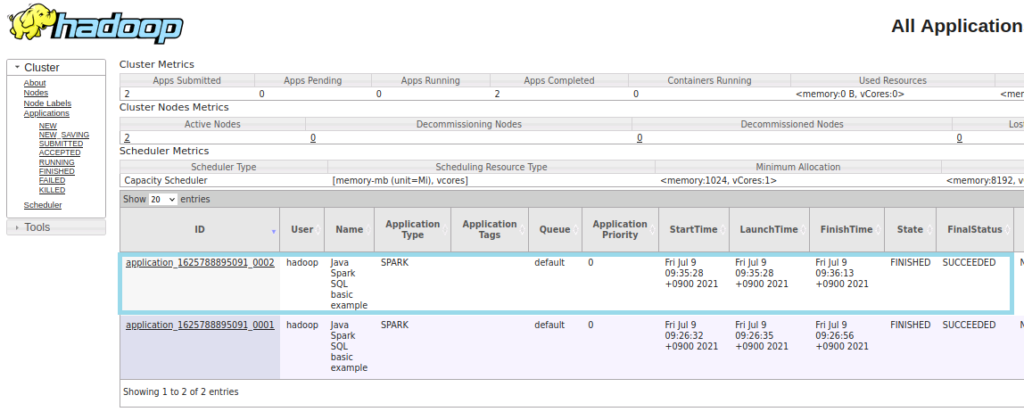
YanUI の表示は以下のようになります。
▼4. 参考情報
Getting Started – Spark 3.1.2 Documentation (apache.org)
以上です。参考になりましたら幸いです。